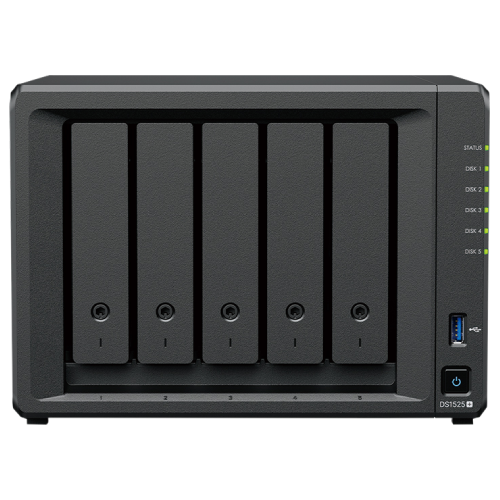
Synology DS1525+ 5-Bay NAS Enclosure

  • Part Number: DS1525+
  • Manufacturer: Synology
  • Quickfind Code: 603075

  • Stock: Out Stock

£899.75 ex. vat
£1,079.70 inc. vat


Product Features:
  • Condition:
  • Capacity Diskless
  • Number of Bays 5
  • Main Colour Black
+ Read More Information

Share:

Product Description

Synology DS1525+ 5-Bay NAS Enclosure

The Synology DS1525+ 5-Bay NAS Enclosure is a versatile storage solution that scales with your needs, with support for storage expansion, 10GbE networking, and SSD caching. Built-in 2.5GbE networking provides excellent networking performance out of the box. Powered by Synology DiskStation Manager (DSM), this device is a flexible all-in-one solution for data sharing, synchronisation, backup, and surveillance.

Key Features

  • Dependable Performance
    Up to 1,181/1,180 MB/s sequential read/write throughput supports stable data transfers.
  • Fast Networking
    Built-in 2.5GbE ports for fast connectivity out of the box with support for 10GbE.
  • Versatile Network Storage
    Leverage built-in file and photo management, data protection, virtualisation, and surveillance solutions.
  • Capacity Expansion
    Add ten (10) extra drive bays for up to 300 TB of raw storage with two (2) DX525 expansion units (sold separately, see accessories tab).

Fast, Out-Of-The-Box Performance With Customisation Options

The DS1525+ features built-in 2.5GbE networking with 10GbE option and supports both SATA SSDs and HDDs in 2.5-inch/3.5-inch internal bays, as well as M.2 NVMe drives via M.2 slots for use as cache.

Expand Capacity for Evolving Needs

Consolidate your data with up to 100TB of raw storage across five (5) bays. Need more space? Add capacity with two (2) DX525 expansion units (sold separately, see accessories tab) for up to 300TB of total raw storage.

Store, Share, and Protect

Manage all your documents, photos, and other files, back up applications and devices, or protect your assets with professional video surveillance.

Private Cloud for Seamless Data Access

    • Streamlined File Management and Collaboration
      Store, sync, access, and share data from any device, wherever you are. Work seamlessly between different platforms and devices, and access your files through mobile apps, desktop clients, and a browser-based interface. Quickly and easily roll back files in case of accidental deletion, mistakes, malware, etc., with versioning.

    • A Private Photo Storage and Management Solution
      Effortlessly back up and organise photos, videos, and other visual assets using intuitive management tools. Automatically organise your content into albums and create secure share links for stakeholders and teammates.

    • Boost Team Productivity With Collaborative Tools
      Enhance workplace collaboration with Synology's productivity solutions. Create, edit, and share documents across teams in real time. Host an on-premises mail server to provide web-based email access while maintaining full data ownership. Additionally, stay connected through secure one-on-one chats, public channels, encrypted private channels, and group conversations.

Multi-Site Synchronisation to Empower Global Workflows

    • NAS-to-NAS Synchronisation
      Improve workflow efficiency and team alignment across data sites with automatic one- or two-way site-to-site syncing. Files and folders are kept up-to-date across sites, so everyone stays aligned, whether at home, in the office, or across different branches — all while maintaining full control of your data.

    • Cloud-Powered Multi-Site Syncing
      Empower global workflows with high-speed access to data from anywhere in your network. Our hybrid cloud solution caches frequently used files locally for rapid access, while less frequently accessed data is stored in the cloud, reducing your on-site storage requirements.

    • Sync to Public Cloud Providers
      Automatically keep data in sync between Synology NAS and major cloud providers, including BackBlaze B2, Dropbox, Google Drive, and Microsoft OneDrive. Multiple protocol support, client-side encryption, and customisation sync and bandwidth controls enable efficient storage management across various platforms.

Comprehensive Data Backup, Protection, and Recovery Solutions

    • Back Up PCs, Smartphones, Cloud Apps, and More
      Consolidate and automate backup tasks for PCs, file servers, VMs, SaaS applications, and more. Administer device backups remotely through a centralised portal and quickly restore specific files or entire devices to keep your business up and running. Take advantage of built-in backup solutions designed to protect your data with seamless 3-2-1 backup configurations.

    • Comprehensive and Flexible Synology System Backups
      Protect all data, applications, and configurations on your Synology systems with comprehensive scheduled backups, including bare-metal backups, to local and remote servers, external drives, or cloud storage destinations, including Synology C2 Storage.

    • Tamper-Proof Protection With Immutable Snapshots
      Safeguard critical LUNs and shared folders with automated immutable snapshots backed by custom retention policies. Built-in support for offsite replication further ensures robust business continuity.

Smart Surveillance

    • Synology Surveillance Station
      Protecting your business has never been easier, with centralised management, support for over 8,700 IP camera models, and remote monitoring and playback. Synology’s scalable video management system provides all the tools you need for live monitoring, investigation, management, and backup.

    • Dual Recording to the Cloud
      Secure your surveillance footage with robust cloud backup that supports end-to-end encryption. Synology's cloud-based surveillance backup solution safeguards your Surveillance Station recordings, allowing you to access, view, share, and download footage through a convenient web portal. Ensure your data remains available even if your on-premises system is compromised.

Versatile Testing Platform

Create a versatile environment for application testing and evaluation, supporting Docker containers and virtual machines. For package and security testing, Virtual DSM acts as a dedicated test environment, ensuring isolation between applications, systems, and data.

Centralised Monitoring and Management

Monitor and manage your Synology fleet from a central interface, on-prem or in the cloud.

  • Central Management System: Manage Synology servers from a central console using group policies, task delegation, batch updates, and more.
  • Active Insight: Monitor your global Synology fleet's performance, backup status, login activity, and more with the power of the cloud.

Performance Backed by Synology Drives

Designed for Synology systems, Synology drives deliver consistent performance and unmatched reliability for your deployments.

Supercharge your setup with Synology router

Pair your NAS with Synology RT6600ax or WRX560 (sold separately) to maximise 2.5GbE connectivity. Enjoy high-speed transfers and secure your network with VLANs, threat prevention, and web filtering — all through a familiar Synology interface.
Technical Specification

Synology DS1525+ 5-Bay NAS Enclosure

Hardware Specifications

CPU

  • CPU Model: AMD Ryzen V1500B
  • CPU Quantity: 1
  • CPU Core: 4
  • CPU Architecture: 64-bit
  • CPU Frequency: 2.2 GHz
  • Hardware Encryption Engine: Yes

Memory

  • System Memory: 8 GB DDR4 ECC SODIMM
  • Memory Module Pre-installed: 8 GB (8 GB x 1)
  • Total Memory Slots: 2
  • Maximum Memory Capacity: 32 GB (16 GB x 2)
    • Synology reserves the right to replace memory modules with the same or higher frequency based on supplier's product life cycle status. Rest assured that the compatibility and stability have been strictly verified with the same benchmark to ensure identical performance.
    • Please select Synology memory modules for optimum compatibility and reliability. Synology will not provide complete product warranty or technical support if non-Synology memory modules are used for memory expansion.
    • For multi-module memory configurations, all modules must be identical and share the same model number. Check the Product Manual of your Synology product for recommended memory configurations.

Storage

  • Drive Bays: 5
  • Maximum Drive Bays with Expansion Unit: 15 (DX525 x 2, sold separately)
  • Drive Type: 3.5-inch SATA HDD / 2.5-inch SATA SSD / M.2 2280 NVMe SSD
  • Hot Swappable Drive: Yes
    • The hot swappable drive feature is not supported by M.2 SSD slots.
    • Compatible drives are mandatory. Please consult Synology's compatibility list before purchasing hard drives.

External Ports

  • RJ45 2.5GbE LAN Port: 2
  • USB 3.2 Gen 1 Port: 2
  • Expansion Port: 2
  • Expansion Port Type: USB-C

PCIe

  • PCIe Expansion: 1 x Gen3 x2 network upgrade slot

Appearance

  • Size (Height x Width x Depth): 166 mm x 230 mm x 223 mm
  • Weight: 2.67 kg

Others

  • System Fan: 92 mm x 92 mm x 2 pcs
  • Fan Speed Mode: Full-Speed Mode, Cool Mode, Quiet Mode
  • Brightness Adjustable Front LED Indicators: Yes
  • Power Recovery: Yes
  • Noise Level: 22.60 dB(A)
  • Scheduled Power On/Off: Yes
  • Wake on LAN/WAN: Yes
  • Power Supply Unit/Adapter: 120 watts
  • AC Input Power Voltage: 100V to 240V AC
  • Power Frequency: 50/60 Hz, Single Phase
  • Power Consumption: 44.56 watts (Access), 13.63 watts (HDD Hibernation)
  • British Thermal Unit: 151.95 BTU/hr (Access), 46.48 BTU/hr (HDD Hibernation)

Temperature

  • Operating Temperature: 0°C to 40°C (32°F to 104°F)
  • Storage Temperature: -20°C to 60°C (-5°F to 140°F)
  • Operating Humidity: 8% to 80% RH
  • Storage Humidity: 5% to 95% RH

Certification

  • FCC
  • CE
  • BSMI
  • VCCI
  • RCM
  • UKCA
  • EAC
  • CCC
  • KC
  • BIS

Environment

  • RoHS Compliant

General DSM Specifications

Storage Management

  • Maximum Single Volume Size: 200 TB (32 GB memory required), 108 TB
  • Maximum Internal Volume Number: 32
  • M.2 SSD Storage Pool Support: Yes
  • SSD Read/Write Cache (Determining cache size): Yes
  • SSD TRIM: Yes
  • Supported RAID Type: Synology Hybrid RAID, Basic, JBOD, RAID 0, RAID 1, RAID 5, RAID 6, RAID 10
  • RAID Migration: Basic to RAID 1, Basic to RAID 5, RAID 1 to RAID 5, RAID 5 to RAID 6
  • Volume Expansion with Larger HDDs: Synology Hybrid RAID, RAID 1, RAID 5, RAID 6, RAID 10
  • Volume Expansion by Adding a HDD: Synology Hybrid RAID, JBOD, RAID 5, RAID 6
  • Global Hot Spare Supported RAID Type: Synology Hybrid RAID, RAID 1, RAID 5, RAID 6, RAID 10
    • Volumes over 108 TB require 32 GB of memory or more.
    • Creating M.2 storage pools requires the use of Synology-verified SSDs, which are rigorously tested under extreme temperature conditions. Thermal parameters for SSDs and NAS units are fine-tuned to ensure optimal management of thermal conditions under I/O-intensive environments.

File System

  • Internal Drives: Btrfs, ext4
  • External Drives: Btrfs, ext4, ext3, FAT32, NTFS, HFS+, exFAT

File Services

  • File Protocol: SMB, AFP, NFS, FTP, WebDAV, Rsync
  • Maximum Number of SMB Connections (FSCT-Based): 40
  • Windows Access Control List (ACL) Integration: Yes
  • NFS Kerberos Authentication: Yes

Account & Shared Folder

  • Maximum Local User Accounts: 1,024
  • Maximum Local Groups: 256
  • Maximum Shared Folder: 256
  • Maximum Shared Folder Sync Tasks: 8

Hybrid Share

  • Hybrid Share Folder Number: 10

Hybrid Backup

  • Data & Folder Backup: Yes
  • Entire System Backup: Yes

High Availability

  • Synology High Availability: Yes

Log Centre

  • Syslog Events per Second: 800

Virtualisation

  • VMware ESXi 6.5 and VAAI: Yes
  • Windows Server 2022: Yes
  • Citrix Ready: Yes
  • OpenStack: Yes

Supported Protocols

  • SMB1 (CIFS), SMB2, SMB3, NFSv3, NFSv4, NFSv4.1, NFS Kerberized sessions, iSCSI, HTTP, HTTPS, FTP, SNMP, LDAP, CalDAV

Supported Browsers

  • Chrome, Firefox, Edge, Safari

Supported Language

  • English, German, French, Italian, Spanish, Danish, Norwegian, Swedish, Dutch, Russian, Polish, Hungarian, Brazilian Portuguese, European Portuguese, Turkish, Czech, Thai, Japanese, Korean, Traditional Chinese, Simplified Chinese

Add-on Packages

Central Management System

  • Yes

Synology Chat

  • Suggested Users: 150

Download Station

  • Maximum Concurrent Download Tasks: 80

SAN Manager

  • Maximum iSCSI Target Number: 64
  • Maximum LUN: 128
  • LUN Clone/Snapshot, Windows ODX: Yes

Synology MailPlus/MailPlus Server

  • Free Email Accounts: 5 (Additional accounts require purchase of licences)
  • Suggested Users: 100
    • The suggested maximum number of users is based on the following workload: 20% of users with a 20,000 item mailbox randomly performing actions and receiving 240 emails per day, and 80% of users receiving 20 emails per day.
    • Operating in high-availability mode will incur additional overhead.
    • Features enabled during evaluation: anti-spam, anti-virus, DNSBL, greylist, content scanning, and full-text search (English).

Media Server

  • DLNA Compliance: Yes

Synology Photos

  • Facial Recognition: Yes
  • Object Recognition: Yes

Snapshot Replication

  • Maximum Snapshots per Shared Folder: 256
  • Maximum of System Snapshots: 4,096

Surveillance Station

  • Default Licences: 2 (Additional cameras require purchase of licences, sold separately)
  • Suggested Maximum IP Cameras and Total FPS (H.264):
    • 1080p: 40 channels, 1050 FPS
    • 3M: 40 channels, 600 FPS
    • 5M: 30 channels, 360 FPS
    • 4K: 20 channels, 200 FPS
  • Suggested Maximum IP Cameras and Total FPS (H.265):
    • 1080p: 40 channels, 1200 FPS
    • 3M: 40 channels, 1000 FPS
    • 5M: 40 channels, 600 FPS
    • 4K: 30 channels, 300 FPS

Notes

  • Use Synology's NVR Selector to quickly find a suitable model based on your requirements.
  • The number of streams that can be viewed simultaneously is twice the suggested maximum number of cameras. For example, if the suggested maximum number of cameras for a model is 10 under H.264, 1080p, the model can support up to 20 streams of the same specification at the same time.

Synology Drive

  • Suggested Users: 80
  • Maximum Number of Hosted Files: 500,000 (applies to files indexed or hosted by Synology Drive. For file access through other standard protocols, refer to the File Services section above)
    • The suggested maximum number of users is based on the following workload: 20% of users randomly perform file operations (upload, download, move, and delete), and 80% of users are logged in but idle.
    • Exceeding the recommended numbers above will not block application operations, but may result in longer response time.

Synology Office

  • Suggested Users: 80
    • The suggested maximum number of users is based on the following workload: 20% of users are executing random actions at an average of 30-second intervals, and 80% of users are logged in and viewing a file.

Virtual Machine Manager

  • Recommended Virtual Machine Instances: 8
  • Recommended Virtual DSM Number (Licences required): 8 (including 1 Free Licence)

VPN Server

  • Maximum Connections: 8

Package Contents

  • 1 x DS1525+ enclosure
  • 1 x Accessory Pack
  • 1 x AC Power Adapter
  • 1 x AC Power Cord
  • 2 x RJ45 LAN Cable

Recently Viewed

Fast Next Day Delivery

Over 20 years of Supply, Service & Support

We Source Hard to Find and Legacy Computer Parts

Free Technical Support