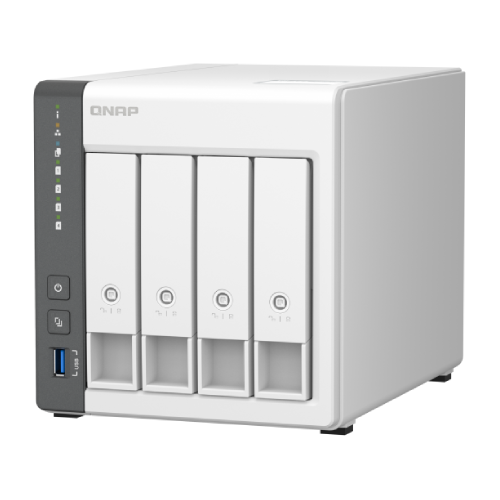
QNAP TS-433 4-Bay NAS Enclosure

  • Part Number: TS-433
  • Manufacturer:
  • Quickfind Code: 603072

  • Stock: Out Stock

£406.59 ex. vat
£487.91 inc. vat


Product Features:
  • Condition:
  • Capacity Diskless
  • Number of Bays 4
  • Main Colour White
+ Read More Information

Share:

Product Description

QNAP TS-433 4-Bay NAS Enclosure

The QNAP TS-433 4-Bay NAS device allows you to run your own personal cloud storage and enjoy easy file access, sharing, and syncing. Designed with a 2.5GbE port to enhance collaboration and increase remote work productivity, the TS-433 also features rich multimedia applications and provides a complete home entertainment portal.

Key Features

  • Capacity
    Un-populated four (4) bay network attached NAS storage device.
  • CPU
    ARM 4-core Cortex-A55 2.0GHz processor, 4 GB on board (non-expandable).
  • Centralised multimedia management
    Centrally store photos, music, and videos; easily browse, organise, and share multimedia files.
  • AI-powered image recognition
    With a built-in NPU (Neural network Processing Unit) processor, the TS-433 boosts performance for high-speed face and object recognition.
  • Home entertainment centre
    Supports ARM NEON technology that accelerates video processing for a greater entertainment experience.
  • Secure remote access
    myQNAPcloud allows you to easily access, manage, and share NAS files via the internet.
  • Snapshot protection against ransomware
    Protect your files and data from accidental deletion and malware attacks by using advanced snapshot protection.
  • Comprehensive security management
    Serves as a secure private cloud and supports user account protection, IP blocking, 2-step verification, encryption access, and more.

Effective cooling fan for heat flow

The TS-433 is small in size and remains high-performance, cool, and quiet with an effective cooling fan.

64-bit Cortex-A55 quad-core 2.0 GHz CPU

Powered by a ARM Cortex-A55 quad-core 2 GHz processor, featuring built-in 4 GB RAM, one (1) Gigabit LAN port, one (1) 2.5 Gigabit LAN port, and supporting four (4) SATA 6Gb/s hard drives, the TS-433 provides dependable read/write performance for running various home and business NAS applications. The TS-433 features AES-NI 256 hardware-accelerated encryption for both full NAS volumes and shared folders, boosting system performance while securing sensitive data.

NPU accelerates on-device AI performance for 6x faster face recognition

With a built-in NPU (Neural network Processing Unit) processor, the TS-433 boosts QNAP AI Core (the AI-powered engine for image recognition) performance for high-speed face and object recognition.

QuMagie Smart photo management

The AI-powered QuMagie with intelligent face and object recognition brings you the ultimate photo management and sharing solution. Includes timeline scrolling, customisation folder covers, iOS Live Photo display, a powerful search tool, and more.

QTS 5, Fast, smooth, and easy-to-use!

The TS-433 comes with the QTS 5 operating system as standard, providing a next-generation usage experience with an updated system kernel, optimised user interface, and advanced security features.

  • Brighter and smoother
    When navigating QTS 5, you will notice a finer attention to detail for a superior browsing experience. Enjoy a smoother NAS experience, comfortable visual design, and find your favourite apps quicker.
  • Get started with the notice board
    When performing first-time installation, the notice board guides you through the setup process. Simply follow the step-by-step instructions for a quick and easy setup.
  • Smooth and reactive user interface
    Whether clicking buttons, switching between apps, or expanding/collapsing windows – every action is much smoother. The search bar in the main menu also assists in quickly finding desired apps.

An easy-to-use, all-in-one backup solution

The TS-433 can do many things, but at its heart is a complete backup solution to protect your files and data. By regularly backing up your files and device content, you can make data loss a thing of the past.

  • Back up Windows/Mac files
    For Windows, install NetBak Replicator to back up your PC to the TS-433. In macOS, simply set up the built-in Time Machine to back up files to NAS.
  • Back up photos on mobile devices
    Install Qfile or QuMagie mobile app and enable the "auto-upload" function. Photos will be automatically uploaded to your TS-433 as soon as they are taken.
  • Back up USB drives & external hard drives
    Simply plug in the storage device to the front USB port of the TS-433 and press the One-Touch Copy button to back up all files to the NAS.
  • Back up Google Drive
    Hybrid Backup Sync can safely back up files and data from Google Drive to the TS-433, helping you save money on cloud storage costs.
  • Back up NAS files to the cloud
    Hybrid Backup Sync supports all your favourite public cloud services, allowing you to effortlessly back up or sync NAS files to cloud storage.
  • Back up NAS files to remote sites
    With Hybrid Backup Sync, you can easily backup or sync files and data from the TS-433 to a remote QNAP NAS or server for multiplied data protection.
  • Back up WordPress sites
    Enjoy efficient WordPress backup/restore and site migration by leveraging the user-friendly Multi-Application Recovery Service (MARS), and easily batch backup WordPress files and database to the TS-433 with backup scheduling.

Protect your data from ransomware threats with Snapshots

Snapshots are an advanced backup method and are normally reserved for high-end business NAS. QNAP provides snapshots as standard for all NAS, including the TS-433. Snapshots work by recording the current state of the system, allowing it to be restored back to this state at any time - greatly helping in mitigating the threat of ransomware.

  • Back up PCs to your NAS
    Always remember to back up! You should routinely (or automatically) back up files and data from your computer to your TS-433.
  • Take snapshots within seconds
    Instantly take snapshots to record the current state of your system and data. You can quickly restore files and data to a previously recorded state by selecting a snapshot version from a specific time point.
  • Back up snapshots
    Multiply data protection by backing up snapshot files! Replicate snapshots in the TS-433 to a remote NAS (Snapshot Replica) and only copy the changes made. This helps save time & bandwidth, and can be run manually or on a scheduled basis.
  • Restore data using snapshots
    Snapshot content can be quickly restored to a local NAS, or restored on a folder/file basis to a local/remote NAS or cloud storage. You can also conveniently view and restore snapshots from the client side.

Centrally store and protect your huge multimedia collection

The TS-433 is your private personal cloud for your movies, videos, photos, and files that are securely at your fingertips anywhere and anytime.

  • Storage for music collections
    Use Music Station to collect and play lossless music, sing along with lyrics, and share albums, playlists or folders with friends and family. You can also put tons of music right in your pocket using the Qmusic mobile app.
  • Store high-resolution videos
    Centrally collect GoPro diaries, videos of your family, friends, and pets in Video Station, and easily share your favourites. Take all your videos with you on your mobile devices using the Qvideo mobile app.

Enhanced multimedia experience

The TS-433 supports ARM NEON technology to accelerate video processing for a greater entertainment experience. Stream media files from the TS-433 to DLNA devices and TVs using common media streaming devices including Roku, Apple TV (via Qmedia), Google Chromecast, and Amazon Fire TV.

Tips for a more productive workday

With a wide range of apps, you can easily access files from various devices, instantly synchronise files with friends’ or colleague’s devices, quickly find specific files, and automatically organise your documents and media files. You can also map the TS-433’s shared folders as network drives on your computers, making accessing NAS files easy and intuitive. The TS-433 helps you save time while being more efficient and productive.

  • File Station
    Easily manage files stored in your TS-433 using the web-based File Station. The Qfile companion mobile app also puts all your files at your fingertips, providing a complete personal cloud service that is accessible from anywhere!
  • Qsync
    Qsync is a perfect replacement of Dropbox, allowing you to synchronise files with computers and mobile devices belonging to your family, friends, colleagues, and clients.
  • Qfiling
    Save time organising and archiving your files with Qfiling. Simply categorise your files, set a schedule, and Qfiling will automatically organise and archive them.

Access your NAS from anywhere

The myQNAPcloud service enables quick and easy remote access to your TS-433, allowing you to be always connected without needing to configure complex network settings. With myQNAPcloud Link you are provided with a unique domain name for your TS-433, and will automatically connect using the best method based on your network environment.

Protect your data with higher security

The TS-433 provides advanced privacy and security settings but is easy to set up and use. Besides IP blocking and HTTPS connectivity, there are more apps that help ensure an optimal level of NAS protection against threats like malware and hackers.

  • 2-step verification
    When activated, anyone who logs in to the TS-433 must enter a one-time verification code after their username and password.
  • Advanced folder permissions
    Easily manage folder permissions, specifying read, read/write, and deny access of individual users to each folder and subfolder.
  • QuFirewall protection
    Supports IPv6, firewall access lists, and GeoIP filtering to restrict access based on geographical locations for higher NAS network security.
  • Superior security with QVPN
    A virtual private network (VPN) allows secure access to network resources and services across public networks. QVPN supports creating a VPN client, using the TS-433 as a VPN server, and WireGuard VPN service with an easy-to-use interface for setting up a secure connection.
  • Security Counsellor
    A security portal for the TS-433 to check for weaknesses and offer recommendations for enhancing NAS security. It also integrates anti-virus and anti-malware scanning software.

Host container applications

If you are curious about Docker or are a hobbyist developer, Container Station on the TS-433 integrates Docker lightweight virtualisation technology, allowing you to run all kinds of self-contained applications. You can download apps from the built-in Docker Hub, including popular and fully-configured applications, and deploy them with just one click. From smart homes to multimedia applications, you can explore your creativity and bring containerised applications to life.

Besides Container Station, more apps (including tools for backup/sync, content management, communications, download, and entertainment) are available from the App Centre. Simply click and install on-demand to further extend the functionality of your TS-433.

Flexible and economical storage expansion

QNAP provides easy and affordable solutions to expand your NAS storage capacity.

  • Attach QNAP expansion enclosures
    Connect expansion enclosures (sold separately) to the TS-433, and manage NAS storage expansion with the user-friendly Storage & Snapshots Manager app.
  • Mount cloud storage or remote file servers
    Mount cloud storage or remote file servers to expand the capacity of the TS-433 while also centrally managing files on the NAS, cloud storage, and remote devices.
  • Migrate to a new NAS
    Install your NAS hard drives into a larger QNAP NAS and retain all your existing data and configurations.
  • Upgrade RAID capacity
    Hot-swap lower-capacity drives with larger-capacity drives to expand your NAS capacity so it can grow with your files and multimedia collections.
Technical Specification

QNAP TS-433 4-Bay NAS Enclosure

Hardware Specifications

CPU

  • ARM 4-core Cortex-A55 2.0GHz processor

CPU Architecture

  • 64-bit ARM

Floating Point Unit

  • Yes

Encryption Engine

  • Yes

System Memory

  • 4 GB on board (non-expandable)
    • Note: Reserves some RAM for use as shared graphics memory.

Maximum Memory

  • 4 GB on board (non-expandable)

Flash Memory

  • 4 GB (Dual boot OS protection)

Drive Bay (un-populated)

  • 4 x 3.5-inch SATA 6Gb/s, 3Gb/s

Drive Compatibility

  • 3.5-inch bays:
    • 3.5-inch SATA hard disk drives
    • 2.5-inch SATA hard disk drives
    • 2.5-inch SATA solid state drives

Hot-swappable

  • Yes

Gigabit Ethernet Port (RJ45)

  • 1

2.5 Gigabit Ethernet Port (2.5G/1G/100M)

  • 1 (2.5G/1G/100M)

Wake on LAN (WOL)

  • Yes

Jumbo Frame

  • Yes

USB 2.0 port

  • 2

USB 3.2 Gen 1 port

  • 1

Form Factor

  • Tower

LED Indicators

  • System Status, LAN, USB, HDD1~4

Buttons

  • Power, Reset, USB Copy

Dimensions (H x W x D)

  • 169 x 160 x 219 mm

Weight (Net)

  • 2.07 kg

Weight (Gross)

  • 3.5 kg

Operating Temperature

  • 0°C - 40°C (32°F - 104°F)

Storage Temperature

  • -20°C - 70°C (-4°F - 158°F)

Relative Humidity

  • 5% - 95% RH non-condensing, wet bulb: 27°C (80.6°F)

Power Supply Unit

  • 90W adapter (12VDC), 100-240VAC

Power Consumption: HDD Sleep Mode

  • 8.45 W

Power Consumption: Operating Mode, Typical

  • 22.54 W
    • Note: Tested with drives fully populated.

Fan

  • 1 x 120mm, 12VDC

System Warning

  • Buzzer

Kensington Security Slot

  • Yes

Max. Number of Concurrent Connections (CIFS) - with Max. Memory

  • 200

Software Specifications

Operating System

  • QTS 5.0.0

Supported Client Operating Systems

  • Apple Mac OS 10.10 or later
  • Ubuntu 14.04, CentOS 7, RHEL 6.6, SUSE 12 or later Linux
  • IBM AIX 7, Solaris 10 or later UNIX
  • Microsoft Windows 7, 8, 10 and 11
  • Microsoft Windows Server 2008 R2, 2012, 2012 R2, 2016, and 2019

Supported Browsers

  • Apple Safari (latest version)
  • Google Chrome (latest version)
  • Microsoft Edge (latest version)
  • Mozilla Firefox (latest version)

Supported Languages

  • Chinese (Traditional & Simplified)
  • Czech
  • Danish
  • Dutch
  • English
  • Finnish
  • French
  • German
  • Greek
  • Hungarian
  • Italian
  • Japanese
  • Korean
  • Norwegian
  • Polish
  • Portuguese (Brazil)
  • Romanian
  • Russian
  • Spanish
  • Swedish
  • Thai
  • Turkish

Storage Pool

  • Yes

SED Storage Pool

  • Yes

Maximum Pool size

  • 308 TB

Maximum number of storage pool

  • 128

Volume Type

  • Thick, Thin, Static

Maximum volume size

  • 250 TB
    • Note: At least 4 GB RAM is required.

Maximum number of volume

  • 128

Maximum shared folder size

  • 250 TB

Maximum number of shared folder

  • 512

JBOD Expansion

  • Yes

VJBOD / VJBOD Cloud

  • Yes

iSCSI Service

  • Yes

Fibre Channel Service

  • Yes

LUN Type

  • Thick, Thin

File-based iSCSI LUN

  • Yes

Block-based iSCSI LUN

  • Yes

Maximum LUN size

  • 250 TB
    • Note: At least 4 GB RAM is required.

Maximum number of targets LUN

  • 256

LUN feature

  • LUN Mapping (LUN can be moved between iSCSI and FC)
  • LUN Masking
  • WWPN Aliases Import/Export
  • FC Port Group
  • FC Port Binding
  • Multipath IO (MPIO)
  • Online LUN capacity expansion
  • LUN snapshot
  • LUN snapshot replication and clone

Auto Tiering

  • Yes
    • Note: Requires minimum 2GB memory.

RAID Type

  • 8-bay (and more): JBOD, Single, RAID 0, 1, 5, 6, 10, 50, 60
  • 6-bay: JBOD, Single, RAID 0, 1, 5, 6, 10, 50
  • 4-bay: JBOD, Single, RAID 0, 1, 5, 6, 10
  • 2-bay: JBOD, Single, RAID 0, 1

RAID Group

  • Yes
    • Note: To ensure data security, system stability, and storage performance, the maximum number of drives for a single RAID group is now 16 (applicable to RAID 5, RAID 6, RAID TP, and subgroups of RAID 50 and RAID 60). Nevertheless, users can combine multiple RAID groups into a large storage pool that contains more than 16 drives, using RAID 50, RAID 60, or RAID 10 as the RAID configuration. This enhancement will only be applied to new RAID groups. All existing RAID groups and storage systems will not be affected.

RAID Level Migration

  • Yes

RAID Expansion (by adding Disk)

  • Yes

RAID Expansion (by replacing bigger Disks)

  • Yes

Storage Pool Expansion (by adding RAID Group)

  • Yes

RAID Hot Spare

  • Global, Local

RAID Sync/Rebuild/Scrubbing

  • Yes

Internal drive

  • EXT4

External drive

  • EXT3, EXT4, NTFS, FAT32, HFS+, and exFAT (optional for ARM model)
    • Note: To use exFAT in certain models you must purchase an exFAT driver licence from Licence Centre.

Disk, Enclosure Locate

  • Yes

Disk S.M.A.R.T. Scan

  • Yes

Disk S.M.A.R.T. Data Migration

  • Yes

Ironwolf Health Management

  • Yes

Secure Erase

  • Yes

SSD Trim

  • Yes

SSD Life Estimation

  • Yes

Disk Roaming

  • Yes

Disk Standby

  • Yes

Volume Snapshot

  • Yes

LUN Snapshot

  • Yes

Minimum Snapshot Interval

  • 5 minutes

Snapshot Retention Policy

  • Yes

Self-serve Snapshot Recovery

  • Yes

Application Consisted Snapshot

  • Yes

Snapshot Full Clone

  • Yes

Snapshot Replica / Vault

  • Yes

SSD profiling tool

  • Yes

External Device Management

  • Yes

Mount Smart Phone (MTP)

  • Yes

External RAID Device (QNAP so on) Management (External Device Mode)

  • Yes

External RAID Device (QNAP so on) Management (NAS Mode)

  • Yes

File Server

  • File sharing across Windows, Mac, and Linux/UNIX
  • Microsoft networking (CIFS/SMB)
  • Apple networking (AFP)
  • NFS version 3/4 services

FTP Server

  • QuFTP
  • FTP, SFTP and TFTP protocols
  • FTP over SSL/TLS (explicit FTPS)
  • FXP support

Maximum FTP connection

  • 1024

File Station (Web)

  • Yes

Object Storage

  • Yes

Local user account

  • 4,096

Local group account

  • 512

Domain user/group account

  • 200,000

Domain Security

  • Yes

Domain Controller

  • Yes

Shared folder permission

  • Yes

Advanced folder permission

  • Yes, (AFP, CIFS/SMB, FTP, and File Station)

Windows ACL

  • Yes, (CIFS/SMB)

User quota

  • Yes

Group quota

  • Yes

Folder quota

  • Yes, (Snapshot shared folder)

Home folder

  • Yes

Resource Monitor

  • Yes

SNMP

  • V2, V3

Network recycle bin

  • Recover files deleted using AFP, CIFS/SMB, and File Station
  • Automatic cleanup and file type filter

System Log & Notification Centre

  • Log recording: 3,000 event per hour

Smart Fan

  • Yes

Schedule on/off

  • Yes

Internet protocol

  • IPv4, IPv6

Virtual Switch

  • Yes

VLAN

  • Yes

DHCP Server

  • Yes

DDNS (Dynamic Domain Name Service)

  • Yes

Network access protection with auto-blocking

  • SSH, Telnet, HTTP(S), FTP, CIFS/SMB, and AFP

Security Counselor

  • Yes

Malware Remover

  • Yes

AES 256-bit Volume Encryption validated by FIPS 140-2 CAVP

  • Yes

2-step verification

  • Yes

Allow/Deny List

  • Yes

Access Protection

  • Yes

Service binding

  • Yes

Firewall

  • Yes

vSphere Web Client Plug-in

  • Yes

VMware vSphere VAAI for iSCSI

  • Yes

VMware vSphere VAAI for NAS

  • Yes

Windows ODX

  • Yes

Windows/VMware Snapshot Agent

  • Yes

HTTP/HTTPS Connections

  • TLS 1.0/1.1/1.2/1.3

Supports WebDAV Connection

  • Yes

Supports Virtual Hosts

  • 32

Qsync

    • Note: At least 1 GB RAM is required.
  • Management Mode
    • User customisation, Central
  • Qsync client supported platforms
    • Windows, macOS, Ubuntu, Android, and iOS
  • Maximum number of version control
    • 64

HybridMount

    • Note: At least 1 GB RAM is required.
  • File Cloud Gateway
    • Concurrent Connections = 20 Upload & 20 Download
  • Network Drive Mount
  • Free cloud gateway sessions
    • 2

HBS (Hybrid Backup Sync)

    • Note: At least 1 GB RAM is required.
  • NAS to NAS backup
  • Cloud Backup
  • Cloud Sync
  • 2-way and Active Sync
  • Apple Time Machine Backup
  • External drive backup
  • Maximum number of backup job
    • 400

Boxafe

    • Note: At least 1 GB RAM is required.
  • Office 365 Backup
  • Google Workspace Backup
  • Full-text search

Qsirch

    • Note: This feature is supported by all QNAP NAS devices with at least 2 GB of memory
  • Previews
    • Photos, music, videos, PDFs, Gmail, and others
  • Integrate Mac Finder
  • Advanced picture search
  • Search filters

QuMagie

    • Note: At least 1 GB RAM is required.
  • Browse photos
  • Virtual and smart albums
  • AI-assisted photo management
    • People, things, places, and others

Antivirus (free)

  • Yes

QVPN Service

    • Note: At least 1 GB RAM is required.
  • Remote Access
    • PPTP, L2TP/IPSec, OpenVPN, WireGuard, QBelt (QNAP proprietary)
  • Supported utility and mobile app
    • Windows, macOS, iOS, and Android
  • Supported maximum clients
    • 100

LDAP Server

  • Yes

RADIUS

  • Yes

SQL server

  • Yes

Licence Centre

  • Yes

Multimedia Console

  • Yes

Photo Station

  • Yes

Music Station

  • Yes

Video Station

  • Yes

Download Station

  • Yes

Notes Station

  • Yes

Qfiling

  • Yes

Media Streaming add-on

  • Yes

QmailAgent

  • Yes

QuWAN

  • Yes

DA Driver Analyser

  • Yes

Q'centre

  • Yes
    • Note: The application is available in the App Centre and in virtual appliance marketplaces (VMware vSphere ESXi and Microsoft Hyper-V).

Q'centre Server

  • Yes

Q'centre Agent

  • Yes

Connect to Q'centre

  • Yes

Container Station

    • Note: At least 1 GB RAM is required.
  • Supported type
    • LXC/LXD and Docker
      • Note: LXD has been supported after Container Station 2.4
  • Docker Hub Registry
  • Container importing and exporting
  • Console mode

QVR Pro

    • Note: At least 4 GB RAM is required. The maximum number of channels supported varies by NAS model, network configuration, and camera settings.
  • Recording Technique
    • Index database based
  • Licence Type
    • Perpetual
  • User-defined trigger events
  • Metadata
  • QVR Pro Client (Desktop)
    • Windows, macOS, and QNAP HybridDesk Station
  • QVR Pro Client (Mobile)
    • Android and iOS
  • Recording camera streams
    • H.264
  • Free built-in camera channels
    • 8

QVR Elite

    • Note: At least 1 GB RAM is required. The maximum number of channels supported varies by NAS model, network configuration, and camera settings.
  • Recording Technique
    • Standard MP4 file based
  • Licence Type
    • Subscription-based
  • User-defined trigger events
  • QVR Pro Client (Desktop)
    • Windows, macOS, and QNAP HybridDesk Station
  • QVR Pro Client (Mobile)
    • Android and iOS
  • Recording camera streams
    • H.264
  • Free built-in camera channels
    • 2

QVR Pro Client

  • Dynamic View Layout
  • Windows
  • Mac
  • HybridDesktop
  • iOS
  • Android

QVR Human

  • Yes

QVR Face

  • Yes
    • Note: The maximum number of channels supported varies by NAS model, network configuration, and camera settings.

QVR DoorAccess

  • Yes

Package

Package Contents

  • 1 x TS-433 Enclosure
  • 1 x Ethernet Cable
  • 1 x AC Adapter
  • 1 x Power Cord
  • 16 x Flat Head Screw (for 3.5" HDD)
  • 12 x Flat Head Screw (for 2.5" HDD)
  • 2 x Drive Tray Keys
  • 1 x Quick Installation Guide (QIG)

Recently Viewed

Fast Next Day Delivery

Over 20 years of Supply, Service & Support

We Source Hard to Find and Legacy Computer Parts

Free Technical Support