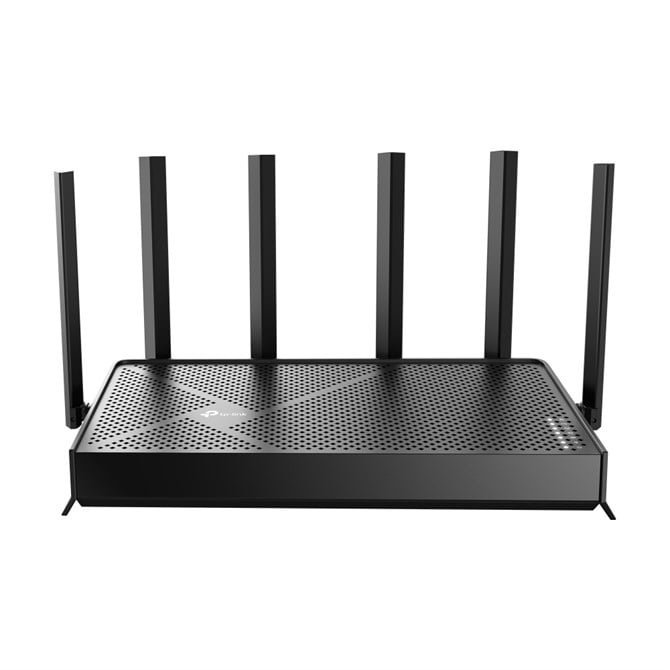
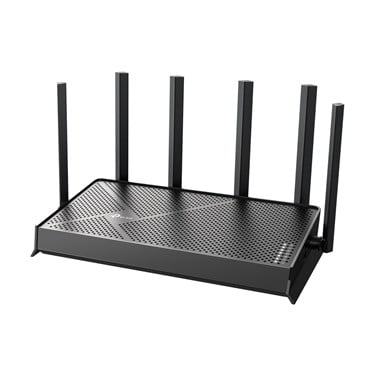
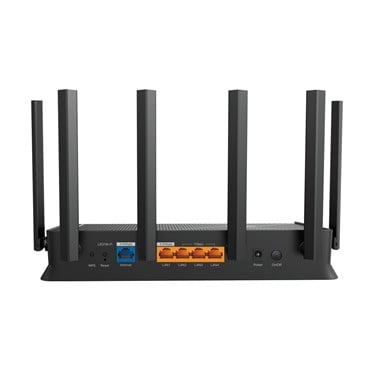
TP-Link Archer BE400 Wifi 7 Wireless Router

  • Part Number: ARCHERBE400
  • Manufacturer: TP Link
  • Quickfind Code: 605081

  • Stock: In Stock

£156.89 ex. vat
£188.27 inc. vat


Product Features:
  • Condition: New
  • Connection Wireless BE
  • Type Wireless Cable Router
  • Main Colour Black
+ Read More Information

Share:

Product Description

6.5 Gbps Dual Band Wi-Fi 7 Speed
Powered by Wi-Fi 7 technology, Archer BE400 delivers incredible Wi-Fi speeds of up to 6.5 Gbps, enabling your devices to run at full speed.

WiFi 7, WiFi Like Never Before
WiFi 7 offers accelerated throughput, lower latency, stronger anti-jamming, and higher efficiency. Join the league of pros and experience the sheer performance of the next generation of WiFi.

4K-QAM
Packs 120% data for higher speeds

Multi-Link Operation
Increases throughput, reduces latency, and improves reliability

Multi-RUs
Makes full use of every resource for maximum efficiency

Boosted Throughput, Unmatched Reliability
Multi-Link Operation (MLO) enables Archer BE400 to transmit data with Wi-Fi 7 clients across multiple bands simultaneously to increase throughput, reduce latency, and improve reliability for various networking behaviors.

2.5 Gigabit Wired Connections Devices
Experience lightning-speed connectivity with dual 2.5 Gbps ports! Archer BE400 features 1× 2.5 Gbps Internet (WAN) port and 1× 2.5 Gbps LAN port, maximizing Gigabit+ speeds delivered by your internet service provider. Break through the 1G bottleneck and unleash peak performance.

6× High Performance Antennas with
Beamforming for a Broader Coverage
Equipped with 6× high performance antennas, Archer BE400 boosts the WiFi signals throughout your home. The Beamforming technology detects devices and concentrates signals towards them, especially to previously hard-to-reach areas.

Create Whole Home Mesh WiFi
Archer BE400 is EasyMesh-compatible. If you have any dead zones at home, just add another EasyMesh router/range extender to further form your whole home multi-gigabit mesh WiFi. No more searching for a stable connection.

WiFi Dead Zone Killer
Eliminate weak signal areas with WiFi coverage for the whole house

Smart Roaming
Uninterrupted streaming when moving around your home

One WiFi Name
No more switching WiFi network names

Unified Management
Manage your whole home WiFi from the central node via the Tether app/Web UI

Set Up in Minutes
Install the Tether app and simply follow the on-screen directions. In just three easy steps your entire home can be blanketed in strong and reliable WiFi.

Your Security is Our Priority
With TP-Link HomeShield, enjoy advanced security features that deliver a safe environment that protects your family and network's data and privacy.

Private IoT Network for More Security
Set up a separate WiFi for IoT devices and overlay HomeShield and advanced WPA3 encryption to better protect the security of your home network and IoT devices.

VPN Clients and Server Supported
Allow devices in your home network to access remote VPN servers without needing to install VPN software on every device. Archer AX55 Pro can run both the VPN and ordinary internet connections at the same time, delivering security and flexibility.

Technical Specification

TP-Link Archer BE400 Wifi 7 Wireless Router

WAN connection
Ethernet WAN
Indicates whether the device features a dedicated Ethernet port for connecting to a wide area network (WAN).
 
SIM card slot
Whether the device features a SIM card slot.
 
3G/4G USB modem compatibility
Indicates whether the device supports the connection of an external 3G or 4G USB modem for cellular internet access.
 
WAN connection type
The physical or logical interface used to connect the device to the wide area network (e.g. RJ-45, SFP, or GPON).
RJ-45
Wireless LAN features
Wi-Fi band
The frequency bands the product features.
Dual-band (2.4 GHz / 5 GHz)
Top Wi-Fi standard
Connection of this device is done via Wi-Fi in a high standard.
Wi-Fi 7 (802.11be)
WLAN data transfer rate (max)
The maximum theoretical speed at which data can be transmitted wirelessly, measured in Megabits per second (Mbps) or Gigabits per second (Gbps).
5764 Mbit/s
Wi-Fi standards
The type of wireless local area network (LAN). It can be ad-hoc, where units in a network communicate peer-to-peer, or Infrastructure, where units communicate with each other via an access point A LAN interconnects computers in a small area e.g. home, school or office.
802.11a, 802.11b, 802.11g, Wi-Fi 4 (802.11n), Wi-Fi 5 (802.11ac), Wi-Fi 6 (802.11ax), Wi-Fi 7 (802.11be)
WLAN data transfer rate (first band)
The maximum theoretical speed at which data can be transmitted wirelessly over the first frequency band, measured in Megabits per second (Mbps).
5764 Mbit/s
WLAN data transfer rate (second band)
The maximum theoretical speed at which data can be transmitted wirelessly over the secondary frequency band, measured in Megabits per second (Mbps).
688 Mbit/s
Modulation
Modulation is the process of varying one or more properties of a periodic waveform, called the carrier signal (High Frequency Signal), with a modulating signal which typically contains information to be transmitted. The aim of digital modulation is to transfer a digital bit stream over an analog bandpass channel, for example over the public switched telephone network (where a bandpass filter limits the frequency range to between 300 and 3400 Hz), or over a limited radio frequency band. The aim of analog modulation is to transfer an analog baseband (or lowpass) signal, for example an audio signal or TV signal, over an analog bandpass channel at a different frequency, for example over a limited radio frequency band or a cable TV network channel.
4096-QAM
Network
Ethernet LAN
An Ethernet LAN (Local Area Network) interface is present, for a wired conection via a cable.
 
Ethernet LAN interface type
The characteristics of the Ethernet LAN interface.
2.5 Gigabit Ethernet
Ethernet LAN data rates
The different speed levels of the Ethernet LAN connection.
1000, 2500 Mbit/s
Port forwarding
Indicates whether the device supports the redirection of network ports to a specific IP address within the local network.
 
Port triggering
Indicates whether the device supports port triggering to dynamically open incoming ports based on outgoing traffic.
 
Dynamic DNS (DDNS)
Indicates whether the device supports a service that automatically updates a DNS record to map a domain name to a changing IP address.
 
Number of guest networks (2.4 GHz)
The maximum number of separate guest wireless networks that can be configured on the 2.4 GHz frequency band.
1
Number of guest networks (5 GHz)
The maximum number of separate guest wireless networks that can be created and broadcast on the 5 GHz frequency band.
1
VPN server
Indicates the type or protocol of the integrated virtual private network server supported by the device (e.g. OpenVPN, PPTP).
OpenVPN, PPTP, L2TP VPN Server, Wireguard VPN
Ports & interfaces
Ethernet LAN (RJ-45) ports
Number of Ethernet LAN (RJ-45) ports (connecting interfaces) in the device. Ethernet LAN (RJ-45) ports allow a computer to connect to the ethernet.
4
USB port
The device features a socket into which a USB cable can be plugged.
 
USB 3.2 Gen 1 (3.1 Gen 1) Type-A ports quantity
The total number of available USB 3.2 Gen 1 (formerly 3.1 Gen 1) Type-A connection ports on the device.
1
Management features
Web-based management
Using a website/web application to manage something.
 
Quality of Service (QoS) support
Indicates whether the device supports Quality of Service (QoS) to prioritize specific network traffic to ensure performance for critical applications.
 
Reset button
Indicates whether the device features a dedicated button to restore the unit to its original factory settings.
 
Management features
WPS push button
Indicates whether the device features a Wi-Fi Protected Setup (WPS) button for simplified wireless network connection.
 
MU-MIMO technology
Indicates whether the device supports Multiple Input Multiple Output technology to allow simultaneous data transmission to multiple connected devices.
 
Security
Security algorithms
Security algorithms are used to provide authentication, cipher key generation, integrity and radio link privacy to users on mobile networks. The security algorithms supported are the ones that can be used with this product.
WPA, WPA-Enterprise, WPA2, WPA2-Enterprise, WPA3
Firewall
Indicates whether the device includes a built-in firewall to monitor and control incoming and outgoing network traffic.
 
Guest access
Indicates whether the device supports a dedicated network for visitors to provide internet connectivity without granting access to the internal private network.
 
Access Control List (ACL)
Indicates whether the device supports the definition of rules to filter network traffic and manage access permissions based on specific criteria.
 
Parental control
Indicates whether the device includes features to restrict access to specific content or limit usage time for children.
 
DMZ support
Indicates whether the device supports a Demilitarized Zone to allow external traffic to reach a specific internal host.
 
Protocols
Universal Plug and Play (UPnP)
Indicates whether the device supports the automatic discovery and configuration of network services to allow seamless communication between devices on a local network.
 
Design
Product colour
The colour e.g. red, blue, green, black, white.
Black
Indication light
Indicates whether the product features a visual light to signal its current status or power state.
 
Product type
The sub-category of the product.
Desktop/pole router
Certificates
Compliance certificates
Indicates which regulatory, safety, and environmental standards the product complies with, as verified by recognized authorities or certification bodies.
CE, Federal Communications Commission (FCC), RoHS
Packaging content
Cables included
Specifies the types and quantities of connection cables provided with the product (e.g., 3.5 mm to 3.5 mm or SATA).
LAN (RJ-45)
AC adapter included
Indicates whether a power supply unit for connecting the device to an AC outlet is provided in the package.
 
Quick installation guide
Indicates whether a simplified, fast-start manual is included with the product.
 
Antenna
Antenna design
Specifies whether the antenna is built into the device or attached as an external component (e.g., External, Internal).
External
Antennas quantity
The total number of antennas integrated into or supplied with the device.
6

Fast Next Day Delivery

Over 20 years of Supply, Service & Support

We Source Hard to Find and Legacy Computer Parts

Free Technical Support