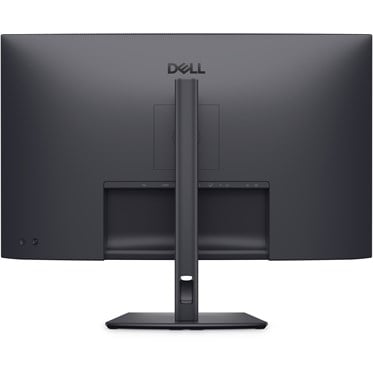
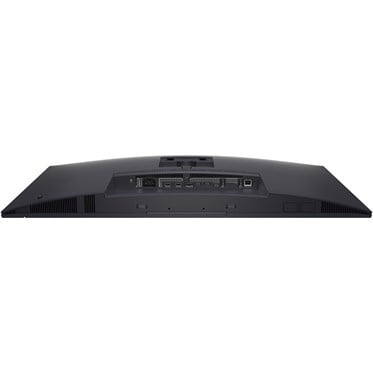
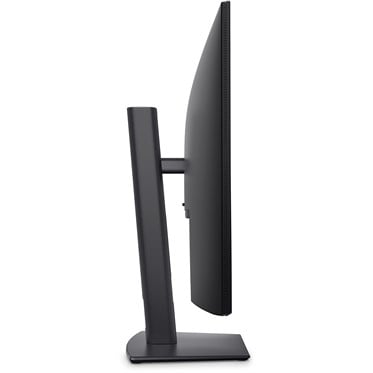
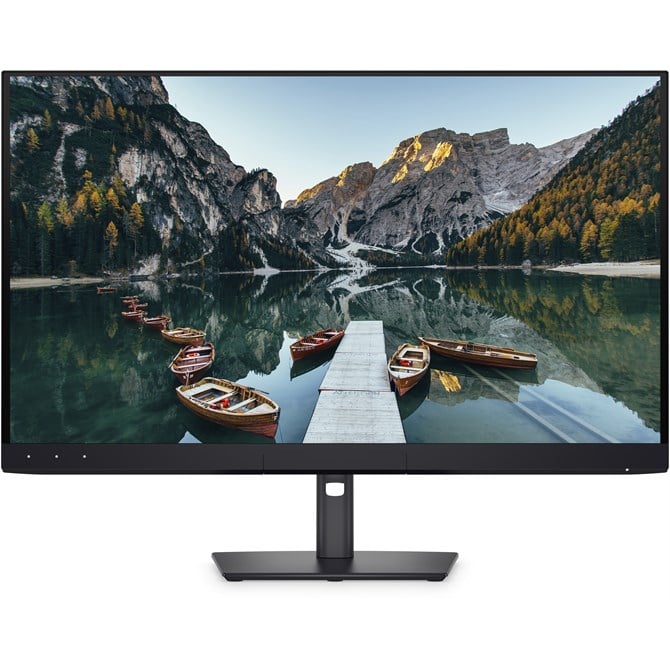
DELL UltraSharp U3226Q 31.5" 4K OLED 120HZ Thunderbolt Monitor

  • Part Number: DELL-U3226Q
  • Manufacturer: Dell
  • Quickfind Code: 550174

  • Stock: In Stock

£1,825.49 ex. vat
£2,190.59 inc. vat


Product Features:
  • Condition: New
  • Size 31.5"
  • Refresh Rate 120HZ
  • Panel Type OLED
  • Resolution 3840 x 2160 (4K)
  • Input Connections DP HDMI Thunderbolt USB-C
  • Main Colour Black
+ Read More Information

Share:

Product Description

Revolutionise colour-critical tasks with precision

Experience the world’s first commercial anti-glare, low-reflectance QD-OLED monitor with DisplayHDR True Black 500 and remote calibration for colour-critical tasks.


True-to-life imagery

Discover vivid, lifelike visuals with the stunning quality of a QD-OLED display, 4K resolution, infinite contrast (1.5M:1), and deep blacks enabled by VESA DisplayHDR True Black 500.


Incredible views with Dolby Vision

See greater visual depth and a stunning range of dark to light colours with Dolby Vision.


Unmatched colour accuracy and professional-grade coverage

This monitor delivers vibrant visuals and true-to-life colours, empowering creators to work with confidence and precision, making it ideal for editing video and graphic images.


Precise colours, every time

Achieve professional-grade colour accuracy with the built-in colorimeter. Calibration results are saved directly on the monitor to retain settings and enable calibration without a connected PC.

Customisable direct keys let creators quickly access common colorist functions, and ICC profile deployment with 3D Look Up Table (LUT) calibration ensures personalised, precise results.


Simplify fleet management with remote calibration

Dell Colour Management Console software enables IT teams to remotely calibrate and manage a fleet of monitors.
Lock and control colour settings across locations and users to deliver reliable and uniform results every time.

Customisable colours
Easily calibrate your monitor’s colours on the new Dell Colour Management software, with Calman Verified certification.

Manage ICC profiles
Create, store, and manage ICC profiles on your computer dynamically through the software dashboard.

Compatible with multiple operating systems
Dell Colour Management software is compatible with multiple operating systems including Windows and macOS®.


Enhanced eye comfort

This monitor is TÜV 4-star certified for eye comfort without compromising colour accuracy.

Reduces blue light
This monitor features hardware low blue light technology, reducing harmful blue light emissions to ≤35% for all day eye comfort without sacrificing colour accuracy.

Smoother visual experience
Enjoy less flicker and seamless scrolling with a 120Hz refresh rate, creating smoother motion.

Anti-glare, low reflectance panel
The Anti-Glare Low-Reflectance (AGLR) screen minimises glare, ensuring clear visuals and consistent colour accuracy in any lighting condition.


Thunderbolt 4

Power your devices with a single cable connection with up to 140W EPR (Extended Power Range) enabled by Thunderbolt 4.


Extensive connectivity

Connect all your devices with a multitude of ports, including a pop-out quick access featuring two USB-C ports (with up to 27W power delivery) and one USB-A port.


Stable connection

Connect to the Ethernet with a built-in RJ45 port with up to 2.5GbE.


Expand your perspective

Experience uncompromised picture quality by daisy chaining two 4K monitors on either Windows, or macOS, powered by Thunderbolt 4.


Works seamlessly with devices on macOS®

Tested with devices on macOS, this Thunderbolt monitor with Display P3 colour is your ideal Mac® devices companion for superb colour coverage and accuracy. Daisy chaining multiple displays via a single cable requires Thunderbolt connectivity. Please check your device for compatibility, as select M-series chips may not support some features. Install Dell Display and Peripheral Manager application to customise advance settings.


Dell Display and Peripheral Manager

Experience Dell’s singular, innovative application to optimise the performance of your entire Dell PC workspace.

Maximise productivity
Easy Arrange tiles apps across screens with pre-set partitions and customises up to five windows, enhancing multitasking. Easy Arrange Memory saves and restores app profiles manually, on schedule, or at start-up.

Easy navigation
Control and work across multiple network or USB connected PCs and monitors with a single keyboard and mouse, seamlessly transferring files between them.

More manageable
Save time and boost IT efficiency with the Dell Device Management Console to manage your Dell peripheral fleet at scale, from a single cloud-based console. Discover expanded Command Line Interface features from Dell Display and Peripheral Manager.


Environmentally forward thinking

Intentional design in every part
At the heart of our design is a commitment to sustainability. That's why our monitor helps reduce waste with a design made from recycled materials, with up to 90% post-consumer recycled plastic, 100% recycled aluminium, 50% recycled steel, and 20% recycled glass.
Environmental standards
This monitor is certified ENERGY STAR®, meaning it meets strict energy efficient guidelines.
Seamlessly modernise your tech
We can help you responsibly and securely retire your legacy IT equipment, regardless of brand, while addressing your sustainability goals.
Packaging with purpose
This monitor ships in a box made from 100% recycled or renewable materials. We are reducing paper usage in monitor packaging, which is equivalent to saving 790 trees annually.

Technical Specification

DELL UltraSharp U3226Q 31.5" 4K OLED 120HZ Thunderbolt Monitor

Display
Display diagonal
Size of the display for this product, measured diagonally, usually in inches.
80 cm (31.5")
Display resolution
The number of distinct pixels in each dimension that can be displayed. It is usually quoted as width × height, with the units in pixels: for example, "1024 × 768" means the width is 1024 pixels and the height is 768 pixels. The higher the number of pixels, the sharper the image.
3840 x 2160 pixels
HD type
Type of supported High Definition (e.g. Full HD, 4K Ultra HD).
4K Ultra HD
Native aspect ratio
The aspect ratio is the ratio of the width of an image to its height. The native aspect ratio is the one which the projector/display is particularly designed for. Images shown in native aspect ratio will utilize the entire resolution of the display and achieve maximum brightness. Images shown in other than native aspect ratio will always have less resolution and less brightness than images shown in native aspect ratio.
16:9
Display technology
The technology used in the display e.g. plasma, LED.
QD-OLED
Touchscreen
A screen of a laptop, smartphone, etc., that responds to touch so you can control the interface using your fingers.
 
Display brightness (peak)
1000 cd/m²
Display brightness (typical)
Display brightness, measured by its Luminance, presented as a figure in nits. Typical brightness ratings for monitors range from 250 to 350 nits with a target value of between 80 to 120 nits being suitable for most displays in a normal viewing environment.
300 cd/m²
Response time
The response time is the time difference between the moment that a source (for example a video card) sends a signal and that equipment (for example a monitor) receives or display the signal. (Used abbreviations: R/F = Rise and Fall.)
0.3 ms
Response time measurement type
GTG (Gray to Gray)
Anti-glare screen
Always gives an optimal view, even in direct sunlight.
 
Screen shape
Flat
Supported graphics resolutions
The graphic resolutions that can be displayed by the device. The graphic resolution describes the width and height dimensions of a display, such as a computer monitor, measured in pixels.
640 x 480 (VGA), 720 x 400, 800 x 600 (SVGA), 1024 x 768 (XGA), 1152 x 864 (XGA+), 1280 x 720 (HD 720), 1280 x 800 (WXGA), 1280 x 1024 (SXGA), 1600 x 1200 (UXGA), 1920 x 1080 (HD 1080), 2560 x 1440, 3840 x 2160
Supported video modes
The video modes that can be displayed by the device.
2160p, 1080p, 720p, 576p, 480p
Contrast ratio (dynamic)
A property of a display system, defined as the ratio of the luminance of the brightest color (white) to that of the darkest color (black) that the system is capable of producing.
1500000:1
Maximum refresh rate
120 Hz
Viewing angle, horizontal
Maximum horizontal angle at which a display can be viewed with acceptable visual performance.
178°
Viewing angle, vertical
Maximum vertical angle at which a display can be viewed with acceptable visual performance.
178°
Display number of colours
1.07 billion colours
Pixel pitch
This is the parameter of a picture tube, which specifies the shortest distance between two dots of the same colour. The principle is: the smaller the dot pitch, the better sharpness of image.
0.1814 x 0.1814 mm
Pixel density
140 ppi
Viewable size, horizontal
The viewable size is often somewhat smaller than the actual size of a monitor, because there is a border around the image.
69.7 cm
Viewable size, vertical
39.2 cm
Digital horizontal frequency
15 - 270 kHz
Digital vertical frequency
48 - 120 Hz
High Dynamic Range (HDR) technology
Dolby Vision, HDR True Black 500
Surface hardness
3H
sRGB coverage (typical)
100%
Adobe RGB coverage
94%
BT.2020 coverage
80%
DCI-P3 coverage
99%
Performance
Flicker-free technology
 
Low Blue Light technology
 
Multimedia
Built-in speaker(s)
The device contains speaker(s) to produce sound.
 
Built-in camera
The product has an integrated camera.
 
Design
Market positioning
Under which category can the device be positioned in the market, e.g. camera phone.
Office
Product colour
The colour e.g. red, blue, green, black, white.
Black
Front bezel colour
Black
Detachable stand
 
Feet colour
The colour of the feet, which are the projecting part on which a device/piece of furniture, or each of its legs, stands.
Black
Ports & interfaces
Built-in USB hub
Whether or not the device features a USB hub to connect more than one other device via USB.
 
USB upstream port type
USB Type-C
Number of USB Type-C upstream ports quantity
1
USB Type-A downstream ports quantity
2
USB Type-C DisplayPort Alternate Mode
 
USB Power Delivery (USB PD)
 
USB Power Delivery up to
140 W
HDMI
HDMI (High-Definition Multimedia Interface) is a compact audio/video interface for transferring uncompressed video data and compressed/uncompressed digital audio data from a HDMI-compliant device ("the source device") to a compatible computer monitor, video projector, digital television, or digital audio device. HDMI is a digital replacement for existing analog video standards.
 
HDMI ports quantity
The number of sockets (ports) for HDMI connections. HDMI (High-Definition Multimedia Interface) is a compact audio/video interface for transferring uncompressed video data and compressed/uncompressed digital audio data from a HDMI-compliant device ("the source device") to a compatible computer monitor, video projector, digital television, or digital audio device. HDMI is a digital replacement for existing analog video standards.
2
HDMI version
2.1
DisplayPorts quantity
Number of DisplayPorts. A DisplayPort is a digital display interface developed by the Video Electronics Standards Association (VESA). The interface is primarily used to connect a video source to a display device such as a computer monitor, though it can also be used to carry audio, USB, and other forms of data.
1
DisplayPort out version
1.4
Thunderbolt 4 ports quantity
2
Headphone out
The socket for connecting headphones to the device.
 
Built-in KVM switch
 
HDCP
High-bandwidth Digital Content Protection (HDCP) is a form of digital copy protection to prevent copying of digital audio and video content as it travels across connections.
 
HDCP version
1.4/2.2
Network
Ethernet LAN
An Ethernet LAN (Local Area Network) interface is present, for a wired conection via a cable.
 
Ergonomics
VESA mounting
 
Ergonomics
Panel mounting interface
The product can be used wih VESA mounting interfaces.
100 x 100 mm
Cable management
Description of improved cable management
 
Cable lock slot
Holes on the edge of devices through which a cable lock can be passed, so the device can be locked to a desk etc.
 
Cable lock slot type
Kensington
Height adjustment
The part of the device that can be adjusted to change the height.
 
Adjustable height (max)
15 cm
Pivot
 
Pivot angle
-90 - 90°
Swivelling
 
Swivel angle range
-30 - 30°
Tilt adjustment
The tilt, which means the angle at which the device is pointing (up or down), can be changed.
 
Tilt angle range
-5 - 21°
Picture-in-Picture
Picture-in-picture (PiP) is a feature of some television receivers and similar devices. One program (channel) is displayed on the full TV screen at the same time as one or more other programs are displayed in inset windows. Sound is usually from the main program only.
 
On Screen Display (OSD)
 
Power
Energy efficiency class (SDR)
G
Energy efficiency class (HDR)
G
Energy consumption (SDR) per 1000 hours
34 kWh
Energy consumption (HDR) per 1000 hours
34 kWh
Power consumption (typical)
Amount of power consumed by this model, often expressed in watts (W). Typical values that manufacturers give are power consumption when off, standby/suspended mode, typical use, maximum usage.
33.7 W
Power consumption (standby)
The amount of electricity that is consumed when the product is on standby.
0.4 W
Power consumption (max)
The maximum amount of power used by the device.
460 W
Power consumption (off)
0.3 W
AC input voltage
The voltage of the AC electricity that is inputted into the product.
100 - 240 V
AC input frequency
50/60 Hz
Input current
5.3 A
Power supply type
The type of power supply which this product uses.
Internal
Energy efficiency scale
A to G
Operational conditions
Operating temperature (T-T)
The minimum and maximum temperatures at which the product can be safely operated.
0 - 45 °C
Storage temperature (T-T)
The minimum and maximum temperatures at which the product can be safely stored.
-20 - 60 °C
Operating relative humidity (H-H)
10 - 90%
Storage relative humidity (H-H)
10 - 90%
Operating altitude
0 - 5000 m
Non-operating altitude
5000 - 12192 m
Weight & dimensions
Width (with stand)
718.3 mm
Depth (with stand)
217.2 mm
Height (with stand)
623.8 mm
Weight (with stand)
9.35 kg
Width (without stand)
718.3 mm
Depth (without stand)
65.5 mm
Height (without stand)
436 mm
Weight (without stand)
6.43 kg
Bezel width (side)
1.23 cm
Bezel width (top)
9.3 mm
Bezel width (bottom)
3.78 cm
Packaging data
Package weight
Weight of the packaged product.
16.3 kg
Packaging content
Stand included
 
Cables included
Power, HDMI, DisplayPort, Thunderbolt
Sustainability
Sustainability certificates
ENERGY STAR
Doesn't contain
PVC/BFR, Arsenic, Mercury
Carbon footprint
Total carbon footprint (kg of CO2e)
The total mean carbon footprint value generated across various lifecycle stages (manufacturing, transportation / logistics, use and end of life) per unit (for one single product) i.e., measured in kilograms CO2e.
815
Total carbon emissions, standard deviation (kg of CO2e)
The total estimated standard deviation of carbon emission calculated over various lifecycle stages per unit i.e., measured in kilograms CO2e. Deviations can be caused due to the use of default, assumed values during calculations.

Fast Next Day Delivery

Over 20 years of Supply, Service & Support

We Source Hard to Find and Legacy Computer Parts

Free Technical Support